Home / Products / IBM/TOSHIBA POS Terminal Parts
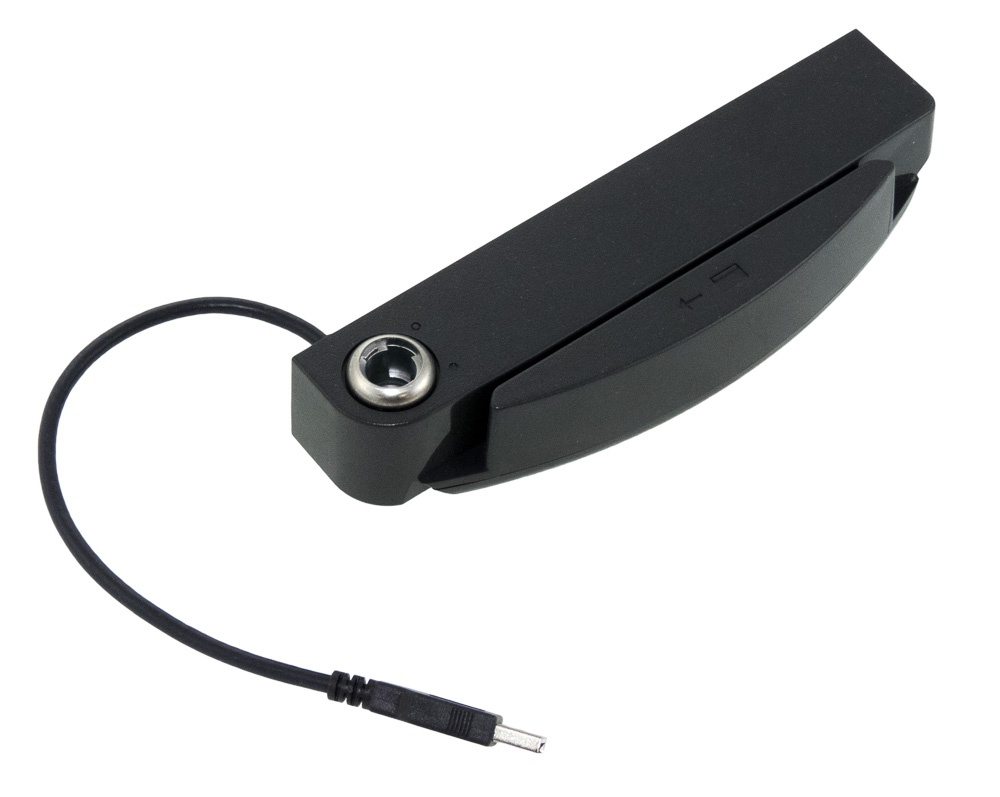
TOSHIBA SUREPOINT 4820 Screen MSR Crad reader Use for 4820-2LG 4820-5LG
ORIGINAL NEW PART
Product Inquiry
Category: IBM/TOSHIBA POS Terminal Parts
All parts are original new, tested before shipping. We can give you a good price, especially for big orders.
Price on inquiry — fastest delivery in 3 Days worldwide.
Email: leoli020@163.com
Tel: +86-15914391946 · WhatsApp: +8615914391946
Description
DS4820AISB1A1A Toshiba SurePoint 4820 Screen MSR Card Reader for 4820-2LG and 4820-5LG
DS4820AISB1A1A is the part-number reference used on this page for the Toshiba SurePoint 4820 screen and MSR card-reader item associated with the 4820-2LG and 4820-5LG terminal references. If you found this page through a service label, repair ticket, or parts list, start by confirming that the number on your unit matches exactly before comparing photos, connectors, or mounting points.
This page is deliberately narrow. A screen and MSR assembly can look similar across POS terminal families, and one different character in a part number can send a repair down the wrong path. The sections below help you separate the DS4820AISB1A1A reference from nearby Toshiba 4820 parts and prepare the information needed for a compatibility check or quotation.
What DS4820AISB1A1A refers to
The page topic combines several identifiers that should be checked together:
- DS4820AISB1A1A: the part number to match character by character.
- Toshiba SurePoint 4820: the terminal family context.
- Screen and MSR card reader: the display and magnetic-stripe-reader hardware area to compare with the old unit.
- 4820-2LG and 4820-5LG: terminal references named in the page topic. Do not assume that every 4820 variant uses the same hardware until the label and old part have been checked.
For a repair buyer, this means the part number alone is a starting point, not the whole identification. The safer approach is to match the number, the terminal reference, and the physical layout of the old assembly. That is especially important when a terminal has been serviced before, because the part fitted in the field may not be the same as the original build list.
Compatibility checks for 4820-2LG and 4820-5LG
Use the following checks before you request a quotation. The aim is to reduce the risk of ordering a screen or MSR item that fits the terminal family but not the exact configuration on your bench.
| Check | Why it matters | Practical step |
|---|---|---|
| Terminal label | The terminal reference tells you which 4820 version you are working on. | Photograph the model and serial label before removing parts. |
| Old part label | The fitted part may carry a label, sticker, or stamped number. | Capture the full label and any nearby barcode in a sharp close-up. |
| Part-number characters | Similar Toshiba 4820 references can differ by only a few characters. | Compare DS4820AISB1A1A against the old label one character at a time. |
| Screen and MSR layout | The display area and card-reader area must match the terminal cut-out and fixing points. | Photograph the front, back, cable exit, and mounting points. |
| Connectors and cable routing | A visually similar assembly may not connect safely or route correctly. | Include photos of every connector and note any locking tabs or cable bends. |
| Scope of supply | Screen, MSR reader, bezel, cable, and mounting hardware may not all be included in the same item. | Confirm what is supplied before treating the part as a complete drop-in assembly. |
If the label is faded or missing, do not rely on appearance alone. Wide photos of the terminal and close photos of the screen and MSR area are more useful than a single front-facing image because they show how the part sits in the housing.
How to verify the correct assembly
A reliable verification process is mostly about evidence. Collect the details below before you remove the old part or place an inquiry.
- Write down the terminal model exactly as shown on the label. Check for 4820-2LG, 4820-5LG, or another 4820 reference.
- Record the full part number from the old screen or MSR item. Keep the spaces, hyphens, and character order visible where possible.
- Photograph the old assembly from several angles: front, back, label, connector side, and mounting area.
- Note whether the card reader is part of the same unit as the screen or a separate module on your terminal.
- Check the condition of the cable and connector before assuming the screen or MSR reader is the only item that needs replacement.
- If any detail does not match DS4820AISB1A1A, ask for a compatibility check rather than ordering by appearance.
This process also helps when a terminal has been through previous repairs. The service history may explain why the fitted part looks different from the expected assembly, and that difference should be resolved before a replacement is chosen.
What to include in a replacement inquiry
A clear inquiry saves time because the part can be checked against the terminal and old hardware without a long back-and-forth. Include the following details where available:
- The exact terminal reference, such as 4820-2LG or 4820-5LG.
- The part number DS4820AISB1A1A and any other number printed on the old unit.
- Photos of the terminal label and the old screen or MSR assembly.
- A close-up of the connector and cable area.
- The quantity required.
- Whether the request is for a single repair, a spare-parts kit, or a planned replacement.
- Any mismatch between the old part label and the part number shown on this page.
If the terminal is still in service, note whether the screen, the card reader, or both areas are involved. That helps separate a display concern from an MSR concern and prevents the wrong assembly from being quoted.
Handling and replacement planning
Screen and MSR hardware should be handled with the same care as other POS terminal components. Power the terminal down before inspection, follow the terminal service documentation for removal and reassembly, and use anti-static precautions when handling electronic assemblies. Keep the old part until the replacement has been checked, because labels and connector details on the removed unit may still be needed for confirmation.
Before fitting any replacement, compare the new item with the old one for connector type, mounting points, cable length, and the position of the card-reader opening. Do not force a connector or bend a cable to make a part fit. If the replacement does not align with the old assembly, stop and confirm the part reference before proceeding.
Next step for DS4820AISB1A1A
To confirm DS4820AISB1A1A for your Toshiba SurePoint 4820 terminal, send the terminal label, the old-part label, and clear photos of the screen and MSR area through the inquiry path on this page. If the label is missing, include wide and close-up photos so the assembly can be checked against the intended 4820-2LG or 4820-5LG configuration before a quotation is prepared.
Related Products